

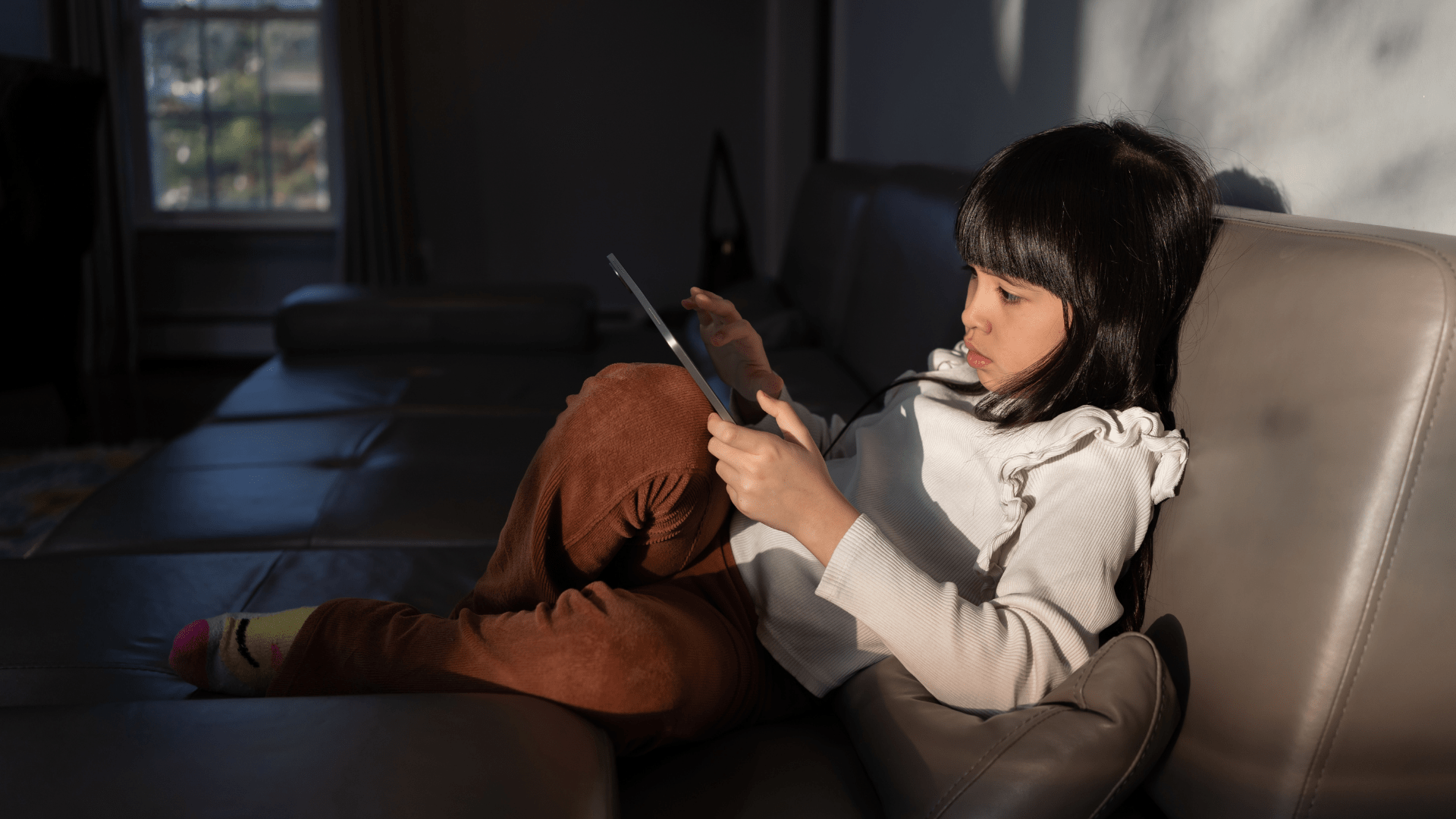
While digital devices like iPads and other tablets can be great tools for childhood learning, over-reliance on iPads for kids’ entertainment can harm their physical and mental health. Here are some of the effects of extensive screen time for kids and what strategies parents can use to mitigate the downsides and maximize the benefits.
In this article:
- The Educational Benefits of iPads
- How Schools Provide iPads to Students
- How Kids use iPads at Home
- Health and Learning Risks of iPads for Kids
- Screen Time Strategies
How iPads Enhance Learning
Research has shown that iPads and tablet use in learning (and in testing knowledge) have yielded positive results in early Math and literacy education.
A 2017 study of almost 500 preschoolers showed that students who used tablets with mathematics learning software for 22 weeks outperformed their peers who were taught in a traditional classroom in the same period of time. iPads can also be useful in helping young children develop early literacy skills (from alphabet knowledge to writing to reading comprehension). A 2015 study of young children (aged 2-4) who used iPads with writing apps showed that there was a positive association between writing on tablets and early phonetic and print knowledge.
When devices like iPads have high-quality educational apps and their use is monitored and purposeful, they can make learning more engaging and effective.
Improved Access
Eliminating the burden of backpacks filled with textbooks and binders, tablets like iPads allow students to access their homework and study materials wherever they are. A digital device holds anything a child needs to learn: assignments and materials provided by their school, note-taking apps, eLearning software, and, of course, the internet’s vast breadth of knowledge on all subjects.
Built-in accessibility tools on iPads can accommodate learning materials to students with different needs. For example: students with dyslexia can change fonts to ones that they find easier to read, screen readers can convey information for those with visual impairments, and keyboard navigation or customized button sizes/locations can help students with motor disabilities.
Interactive Educational Material
iPads offer students a sensory learning experience, more engaging than static textbooks or paper worksheets. There are tons of educational apps that bring concepts to life, creative apps that let kids draw and experiment with shapes and colors or map out concepts, and apps with gamified math practice that keeps kids interested and motivated to work through problems. (Research has shown that gamified math learning improved early numeracy learning outcomes for preschool-aged children, and it makes sense—when kids feel like they’re playing instead of studying, their attention and persistence improves.)
The real-time feedback available in eLearning apps on iPads helps kids quickly get on the right track, steering them away from incorrect concepts.
Personalized Practice
While classrooms are too large to allow sufficient 1-on-1 learning with a teacher, educational apps can make up for some of that hand-held practice with immediate feedback and personalized learning.
Apps like Piqosity can give students personalized practice questions, tailored their practice to their unique topic strengths and weaknesses. Features like Piqosity Virtual Tutor help students tackle the root concept they don’t understand, filling knowledge gaps before they can deepen.
Due to their customizable nature, iPads can also help students with different learning styles find the best way to learn for them. Visual learners can easily access diagrams and visual representations or color-code their notes efficiently, while auditory learners can use text-to-speech functions so that they can read along as their learning material is read aloud.
iPads in Schools
The vast majority of public schools in the United States now have a program that provides iPads for kids. In many districts, every student is supplied a digital device for the purpose of completing schoolwork online. 27% of those schools provide tablets, most of which are iPads.
These are some of the schools that have prioritized developing a digital habitat of learning for their students.
Presbyterian School (Houston, TX)
Located in the Museum District of Houston, TX, Presbyterian School teaches Pre-K through 8th grade and has a focus on digital learning for students of all ages. Pre-K and Kindergarten classes use class sets of iPads, 1st-5th grades have laptop & iPad carts shared between classrooms, and all kids from 5th through 8th grade have their own laptop.
While iPads can be excellent learning tools, they are more than portals to school curricula and a world of knowledge. By providing each middle schooler their own iPad, Presbyterian School helps them build the digital literacy they need to succeed in their education and future careers.
Miami-Dade County Public Schools, FL
M-DCPS also operates a 1:1 digital device program, with iPads as the standard for younger students (K-5) and laptops for middle and high schoolers. It also maintains a BYOD (Bring-Your-Own-Device) policy, where students who have iPads or laptops can bring them to school instead of being issued a new one, so long as they only use it through a secure district portal.
The district’s app ecosystem allows students access to grades, programs for extracurriculars, logistics like bus routes, and more. M-DCPS is prioritizing staying ahead of the curve, providing AI-powered SAT prep for high schoolers as of 2026.
Los Angeles Unified School District, CA
LAUSD has hundreds of thousands of iPads and Chromebooks that are distributed to its students, and it has given every student a device for years. It has a centralized IT help desk to help manage the vast inventory, and it led initiatives to bring low-cost WiFi to homes across the district. Its 2013 rollout of iPads to all students was one of the first school district device distributions, but it came with its own issues (lack of teacher training, security filters, etc). Since then, it has improved upon and maintained its vast inventory of iPads and Chromebooks.
In April 2026, the LAUSD board passed a resolution to recalibrate its device policy, including: a ban on devices for kids in 1st grade and below, the replacement of 1:1 devices with shared laptop carts or computer labs for grades 1-5, screen time caps based on grade level, and content restrictions that prohibit gaming and video streaming. These restrictions aim to maximize the benefits of technology like iPads while minimizing the risk to students’ mental and physical health.
iPads and Screen Time in 2020s Households
As smart devices have proliferated across households in America in the past few decades, their regular use by children has risen dramatically. The number of children with access to smart mobile devices at home jumped from 52% in 2011 to 75% in 2013. Over 10 years later, kids don’t just have devices present in their homes—they have their own devices, with 2025 research finding that 80% of children under 13 have their own device (and 59% began using screens before age 3).
Children are using these devices for a long time every day. Kids under 9 average about 2.5 hours of screen time per day, with 5-8 year olds engaging with screen content for about 3.5 hours. On average, kids aged 8-12 use devices for around 5.5 hours a day, and teens spend more time consuming digital media than they do at school, clocking in an average daily screen time of 8.5 hours.
Screen Time Habits & Parents’ Perspectives
The vast majority of children’s screen time is spent on entertainment such as YouTube videos, watching television, or playing games. Social media is typically next, while reading and educational apps or content are not a priority.
Almost half of parents with kids under 13 report that they rely on screen time to support their parenting responsibilities. With adequate childcare unavailable or unaffordable for many families, 25% of parents use screens in lieu of babysitters. The close proximity kids have with their iPads or other devices causes a dependence on them, leading to even more device use and tantrums that ensue when screen time is over. Most parents understand that their kids are on their devices too much and want to reduce that screen time, with half of parents worried that it has become an actual addiction.
Human interaction, outside activities, and tactile, hands-on play are all important to the healthy development of children. When screens replace those activities, it hinders the child’s growth.
Are iPads Bad for Children’s Health?
Many things done in excess can harm one’s health and wellness, including the use of digital devices. Excessive screen time can be detrimental to the development of children— over-reliance on iPads for kids’ entertainment and learning leads to physical and cognitive health implications. Here’s what research says about the short and long term effects of iPads for kids.
Cognitive & Emotional Health
Digital devices offer kids opportunities for learning, creativity, and reading that can help them improve their literacy and thinking skills from a young age. With a tablet, a child can take books, learning activities, a canvas and paints, and access to boundless information about the world with them wherever they go. The most significant findings in this regard showed that. Depending on schools’ homework policies, tablets can also allow children to complete school assignments on the go.
However, these benefits are largely outweighed by the risks of tablets to children’s social-emotional growth and their cognitive and linguistic learning.
1. Cognitive Health & Executive Function
Studies have shown that passive screen time (consuming content, such as watching TV—as opposed to active screen time, which involves interaction and thought like reading or playing video games) is negatively associated with executive functioning. Students are less able to focus or demonstrate inhibition and working memory if they spend excessive time passively consuming digital content.
Media multitasking (like scrolling social media while watching TV, something very common among today’s children) has also been found to have a negative effect on executive functioning skills such as working memory and the ability to switch between tasks as well as lower standardized test scores.
2. Language Development
While iPads can help kids learn their ABCs and improve their reading skills, they are generally harmful to children’s actual language-learning.
Vocabulary and phonology can be taught through a textbook or an educational app, but they are learned and remembered by children through human interaction and the feedback that comes from conversation. Because screen time reduces interaction between children and their parents, siblings, caregivers, and others, it directly cuts down the opportunities for children to learn how to speak and comprehend language.
3. Social-Emotional Development
Smart devices are ubiquitous in our society, coinciding with an overall decrease in engagement with nature and other people. This phenomenon in the lives of children can hinder their social-emotional development as the regular interaction they are used to is through their devices, limiting their opportunities to engage with the world and learn the skills they need to navigate it. Empathy, conflict resolution, and emotional grounding are all becoming difficult for kids who’ve had excessive screen time throughout their childhoods.
For example, iPads are often used as a pacifier to keep children occupied when they would otherwise be bored. When a child is used to the device at their fingertips and it’s taken away, what often ensues is a tantrum that parents will often appease by returning their device. (Essentially, the “iPad Kid” phenomenon.)
Physical Health
Not only does excessive iPad or device use lead to cognitive development issues, but it can harm a child’s physical wellness. High screen time is closely associated with adverse health outcomes among adolescents.
1. Screen Time and Sleep
The blue light from screens affects the eyes differently from other forms of visible light, and studies have shown that too much of it can cause ocular and neurological issues. Prolonged screen time can cause eye strain, headaches, dry eyes, disruption of the circadian rhythm, and even (uncommonly) cataracts or retina issues.
Blue light interferes with the brain’s ability to produce melatonin, which is what makes one feel sleepy. This is why all advice for falling asleep more easily involves putting away all screens more than 30 minutes or an hour before bed. Quality sleep is essential to a child’s development and daily wellness (and lack of sleep contributes to behavioral and mental health issues), so gazing at screens should be avoided when bedtime approaches.
2. “Tech Neck”
Most people tilt their heads down or hunch over as they use digital devices. Repeated hunching throughout every day leads to “tech neck” (or “text neck”): chronic neck or shoulder pain as a result of poor posture when using phones or other devices. Constantly looking down at a phone or iPad makes your head exert extra force onto your neck, causing muscle tightness that results in knots or pain.
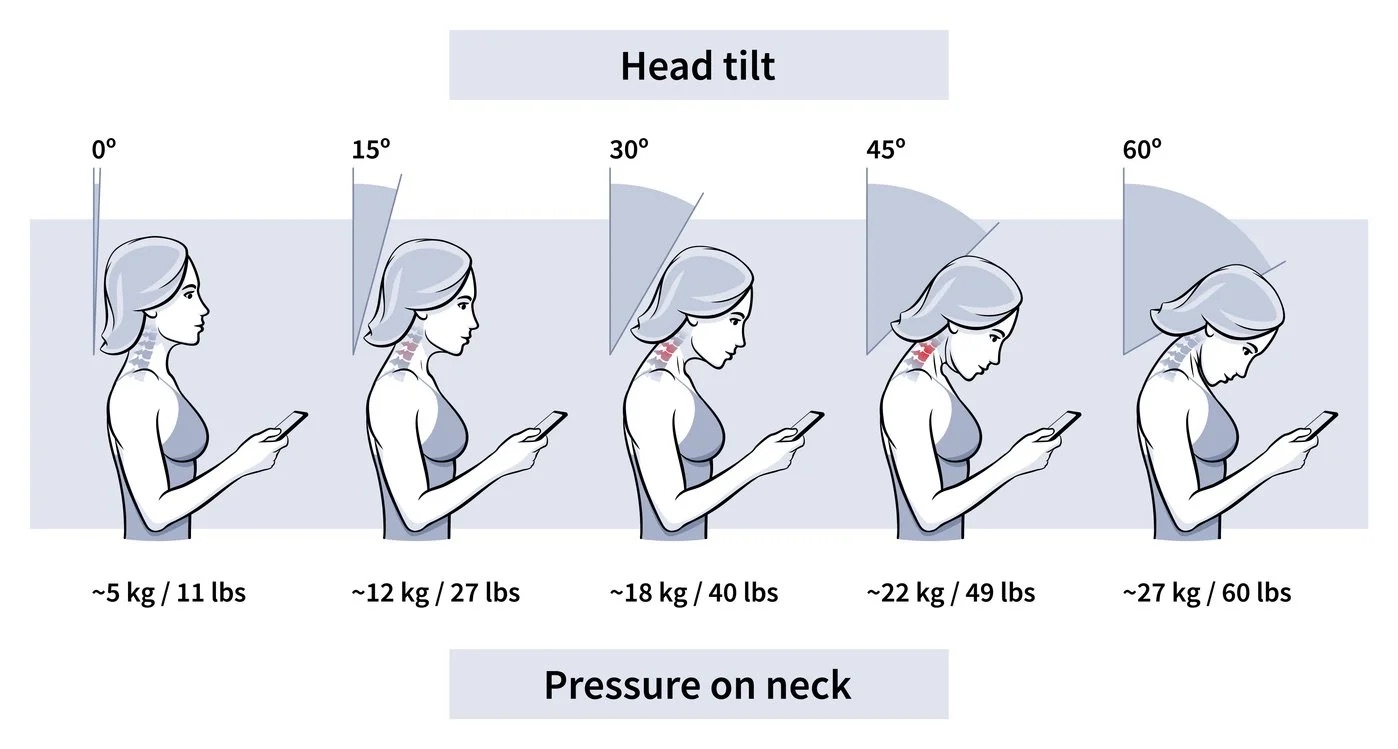
Children and adolescents who exhibit this behavior often experience symptoms like headaches and musculoskeletal pain. Over time, the excessive downward gaze can caused the spine to abnormally curve forward at the neck. Pain can worsen into adulthood if this remains is unaddressed.
3. Sedentary Behavior & Obesity
Finally, screen time is a sedentary activity, and too much of it puts children at risk of developing health concerns such as cardiorespiratory issues, obesity, sleep issues, and weak bones/muscles. Not only do screens keep kids seated and off their feet, but the act of sitting and watching something like TV or YouTube can lead to overeating (especially when TV commercials for yummy snacks come on right after lunchtime…).
Signs That iPad Use is Harming Your Child
If you are a parent whose child is developing concerning behaviors or habits and they are a regular iPad user, the device may be doing more harm than good. Here are some signs it’s time to re-evaluate and change your child’s relationship with their iPad.
- Dependence on the device. How does the child behave when the iPad is taken away? Throwing a tantrum, constant begging or irritability, sneaking around with the device, hiding it when you enter the room, etc.
- Communication issues. Is your child delayed when it comes to linguistic and social development? Listening issues, unable to participate in a conversation, no interest in face-to-face play, difficulty reading facial expressions, etc.
- Loss of interest elsewhere. Does it seem like all your child wants to do is use the iPad? Dropping hobbies they used to love (drawing, playing with toys, sports, etc), unable to play alone, loss of imagination, always “bored” when not using the iPad, rewards seem underwhelming to them, etc.
- Cognitive performance issues. Is your child having trouble paying attention? Cannot stay focused on tasks requiring sustained attention (reading, test-taking, homework), daydreaming, cannot easily switch between tasks, etc.
- Physical health issues. Is your child having difficulty falling or staying asleep, complaining of neck pain or headaches, frequently rubbing their eyes, or complaining of blurry vision?
iPads for Kids: Screen Time & Strategies
There are many health risks associated with prolonged screen time in young children, but there are ways to use iPads effectively as a tool for academic development. The key is moderation!
Regulate Screen Time
Parents should set boundaries for their children’s use of smart devices. Time spent in the digital world should not exceed time spent exploring and engaging with the real world; rather, real world-time should greatly outweigh time spent online.
Set Daily Screen Time Limits
Reduce a child’s screen time by setting daily time limits on the iPad.
How much screen time is too much? Age is the major factor to consider when determining screen time restrictions for children. According to health professionals, children under two should not have any screen time due to the negative developmental effects (video chatting is the one use case that seems to be okay). Children aged 2-5 can benefit from high-quality content and activities on iPads and other devices, although their screen time should be strictly limited (and monitored). For older children, it can depend on their development.
Recommended Screen Time by Age
- 0-18 months – 0 hours
- 18-24 months – <30 minutes
- 2-5 years – <1 hour (up to 2, depends on their development)
- 6-12 years – 2-3 hours (depends on their development)
- 12+ years – case-by-case,
Not only should there be a daily time limit for iPads for kids, children should also take frequent breaks from their device to reduce both physical and mental health risks. The 20/20/20 rule to prevent digital eye strain recommends taking at least a 20-second break every 20 minutes to look at something 20 feet away. Hours of screen time a day should also be broken up into chunks, making each instance of device use intentional. (This will also improve their enjoyment of the device and help them part with it more easily when the day’s screen time is up.)
Create “Screen-Free” Areas & Times
Children who understand there is a time and a place for iPad use develop a healthier relationship with their device. Make certain areas of the home “Screen-Free”, such as the dinner table, and prohibit device use within an hour of bedtime. Encourage your child by setting a good example—abide by your own rules and put your phone up!
Ensure Quality Screen Time
Through chaperoning a child’s screen time, parents can ensure that their children are engaging with quality content that is appropriate for them. Experts say that the quality of media children are exposed to can be even more important than the amount of time they spend with technology—high-quality media for children should be at a slow enough pace for them to understand, appropriate for their age, enjoyable for the child, and usually educational or plot-driven.
Studies have shown that many of the cognitive risks associated with excessive screen time are mitigated when a child is “co-viewing” content with someone else. Parents watching content with their children improves the child’s understanding of the content, is associated with better mental health outcomes for the child, and simply gives them a chance to discuss the content, which can improve children’s understanding of stories and how to view media.
Something that’s even better for the child than watching quality shows, even with a parent, is active screen time where the iPad allows the child to interact with content, not just view it. Examples are reading, educational games, apps that allow creative expression, and even videos with interaction built-in. Studies showed that children were better able to retain information from educational content that is interactive as opposed to educational videos. Active engagement with content on an iPad allows a child to develop a relationship with the device that is similar to how they view other toys—something fun (and educational), not something they depend on.
Learning ELA & Math on Digital Devices
One of the most constructive uses of iPads for kids is online learning! With short bursts of studying and the right educational materials, students often find learning and practice with an iPad more engaging and more instructive than with a pen and paper due to its responsiveness and their comfort with technology.
Online after-school programs make it easy for students to get personalized academic support on their own schedule. Whether you’re looking for academic remediation or enrichment, Piqosity can help!
Piqosity has an abundance of resources that can help your child excel in online after-school learning on their digital device, with courses including:
- Hundreds of adaptive practice questions
- Dozens of concept review lessons
- 100+ reading passages (in ELA courses)
- 1000+ practice questions (in math courses)
- 10+ practice tests (in test prep courses)
- Intelligent math remediation
- Tutorial lessons with videos
- Strength & weakness analysis
- Gamified practice
- Dynamic question difficulty
- Score reports & score predictions
- Piqosity Virtual Tutor
- …and more!
Joining Piqosity is completely FREE (no credit card information required, no sneaky “free” trials). Start off with our mini diagnostic test to get a baseline score, and set realistic goals for your student’s success.
Then, you and your student can figure out a plan for exactly how they’d like to study. You can continue to use many of Piqosity’s unique features and valuable resources as part of our FREE Community package. But, if you’re ready for the next step, you can choose among several competitively-priced test prep or course-based packages. We currently offer:
Online Test Prep Courses
When you sign up for Piqosity, you have access to our materials for 365 days. So, no matter how many times your student takes a test (such as the SAT) or how long they struggle in a specific class, you will have the resources of Piqosity on your side.

